Where scene geometry costs live - draw calls, LOD chains, instancing, HLOD, mobility - and when Nanite does (and doesn't) save you.
On non-Nanite content, the render thread usually chokes on draw call count before the GPU chokes on triangles. Every mesh section x every material slot x every shadow-casting light is submission work. Check stat scenerendering. The levers: merge material slots (a prop rarely needs four), combine small meshes, instance repeats, and give everything sane cull distances.
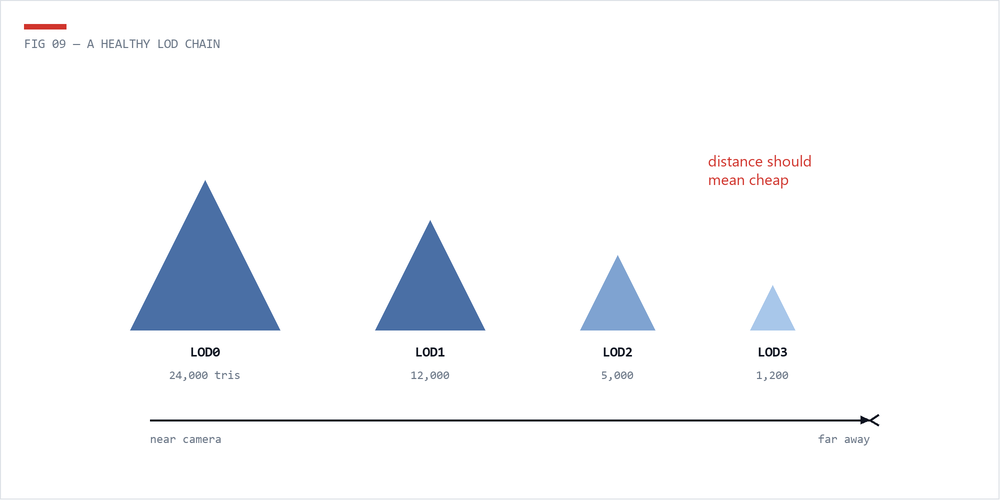
Every non-Nanite mesh that appears at range needs a LOD chain - typically 3-4 levels halving triangle counts, with auto-generation fine for most props. Missing LODs is the single most common mesh defect in real projects: a 400k-triangle hero rock rendered at full density from 200 meters away. Verify with the LOD Coloration view mode; set screen sizes so transitions happen before you can see them.
High-poly meshes with LOD count = 1 are the first thing the Asset Health Dashboard hunts for - it's the highest-value automated check in the toolbox.
Nanite virtualizes geometry: it renders roughly pixel-density triangles regardless of source polycount, eliminating LOD authoring and most draw-call pressure for opaque static geometry. Enable it for dense environment meshes, kitbash and scan content.
It's not free or universal: there's a fixed base cost per frame (fine when amortized over a Nanite-heavy scene, wasteful for a few props), and masked/two-sided/WPO materials, translucency, and skeletal meshes have restrictions or extra cost. Aggregate geometry like foliage needs care. Small teams' rule of thumb: Nanite for static opaque environment geometry; classic LODs for everything else. Check cost with the Nanite visualization view modes.
A thousand copies of the same rock should be one instanced draw (ISM/HISM or the Foliage tool), not a thousand StaticMeshActors. For big worlds, HLOD merges distant clusters into single proxy meshes so the horizon costs a handful of draws. World Partition automates much of this - but only if assets are authored instancing-friendly.
From the master checklist's highest-value rules: anything that doesn't move should be Static (Movable costs more in lighting, shadows, and transforms); disable shadow casting on small, distant, or insignificant objects - the shadow often costs more than the object; and cull aggressively - clutter, decals, and props need draw distances. Distance culling is nearly free; rendering a paperclip at 500m is not.
 The Technical Artist