PBR inputs, the material graph, and the master material + instance workflow that keeps a project's shaders sane and its artists fast.
Unreal's default shading model is metallic/roughness PBR. Ninety percent of surfaces use five pins: Base Color (no lighting baked in), Metallic (0 or 1, rarely between), Roughness (where all the surface character lives), Normal, and Ambient Occlusion. Emissive adds glow; Opacity/Opacity Mask appear only in translucent/masked blend modes - both cost extra.
The graph compiles to HLSL - every node is shader code, and every pixel on screen pays for it. The core vocabulary: TextureSample, Multiply/Lerp/Add, TexCoord for tiling, Fresnel for rim effects, and Time + Panner for animation. Scalar and Vector Parameters (instead of constants) are what make instancing possible - name them properly from the start.
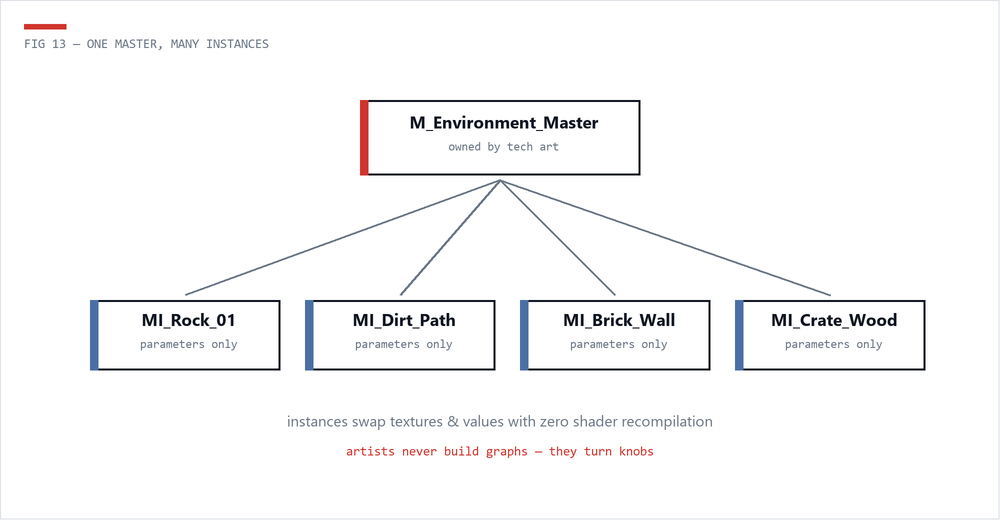
The material habit that saves the most pain: artists should almost never create materials - they create Material Instances of a small set of master materials owned by tech art.
M_Environment_Master) defines the logic once: texture parameters, tiling controls, detail normal blending, wind, tint.MI_Rock_01) swaps parameters with zero recompilation - instant iteration for artists.A well-designed master material library - 3 to 8 masters covering environment, props, glass, foliage, decals - is one of the highest-use things a TA ships on any project.
| Feature | Cost reality |
|---|---|
| Opaque material, few samplers | The happy path - cheap |
| Masked | Moderate - disables early-Z optimizations where used |
| Translucent | Expensive - every overlapping layer shades the same pixel again (overdraw) |
| Two-sided | Doubles rasterization work - reserve for foliage/cloth |
| World Position Offset | Vertex cost on everything using it, plus shadow/culling side-effects |
| Many texture samplers | 16+ samplers stalls; pack channels (ORM) instead |
Check your work with the Shader Complexity view mode and the stats panel in the material editor. The deep dive lives in Performance -> Materials & Shaders.
 The Technical Artist