When stat unit says Game, the frame is being spent in gameplay code. Tick discipline, Blueprint costs, garbage collection, and pooling.
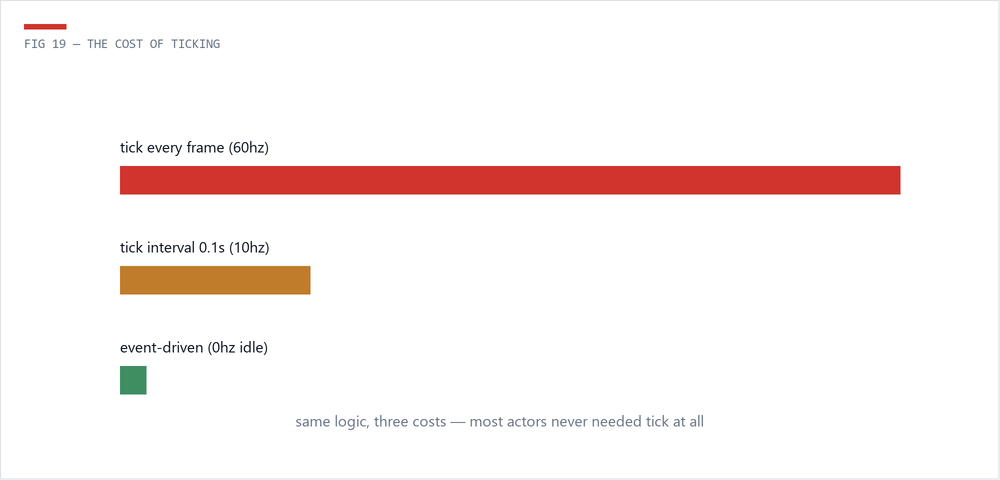
Every ticking actor and component pays overhead every frame before its logic even runs. A thousand idly-ticking props is a tax on every frame of the game. The rules: Start with Tick Enabled = false as the default stance; drive logic from events, timers, and delegates; when ticking is genuinely needed, set a Tick Interval (0.1s is 6x cheaper than every frame at 60fps); and tick only while relevant (visible, nearby, active).
Find offenders with stat game, Unreal Insights, or simply: dumpticks in the console lists every ticking object. The count is usually a surprise.
BP execution has per-node overhead - trivial for event-driven logic, painful in per-frame loops over hundreds of items. The classic offenders: Get All Actors of Class in Tick (cache at BeginPlay instead), heavy math in loops (move to a C++ or math-expression node), and cast chains creating hard reference webs - casting to a heavy class pulls it and everything it references into memory at load. Prefer interfaces and component lookups. For hot paths, the honest answer is nativization by hand: ask an engineer for a C++ base class.
UE's garbage collector periodically scans object references, and big scans cause frame hitches. TAs' contribution: spawn less (see pooling), avoid creating/destroying objects in gameplay loops, and keep reference webs small so scans stay cheap. If players report a rhythmic stutter, suspect GC and confirm in Insights.
Object pooling: spawning and destroying is expensive; for anything spawned repeatedly (projectiles, impact VFX, pickups), pre-spawn a pool, deactivate and recycle. Significance: not everything deserves full simulation - distant or off-screen characters can tick less, animate at lower rates (Update Rate Optimization, Animation Budget Allocator), and skip cosmetic work. The Significance Manager formalizes exactly this pattern.
Game-thread milliseconds are interchangeable: one bad BP loop equals five hundred idle ticks equals one GC scan. Profile first, then spend your effort on the biggest number.
 The Technical Artist